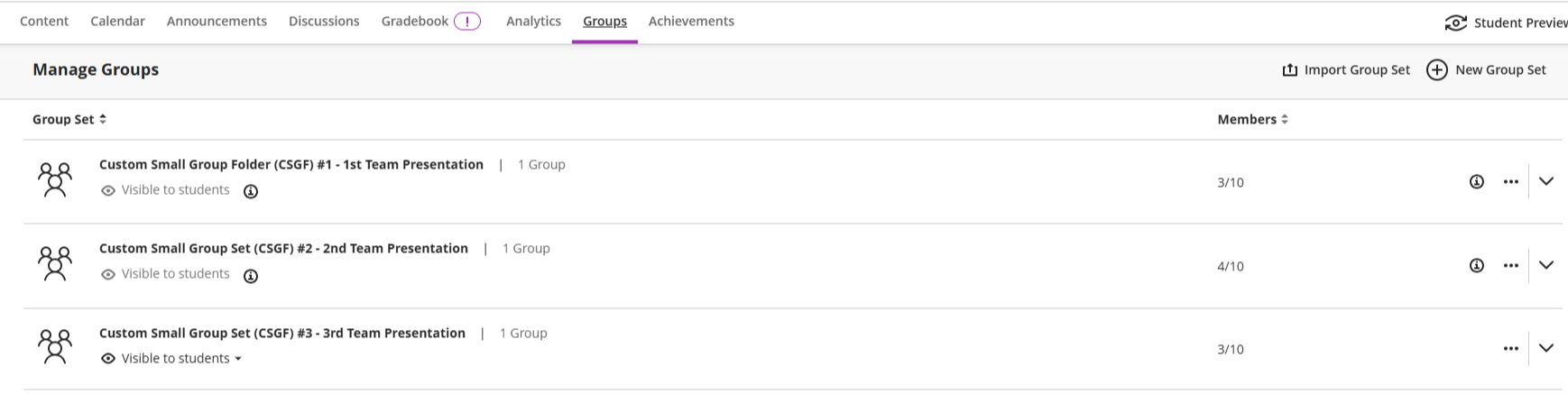
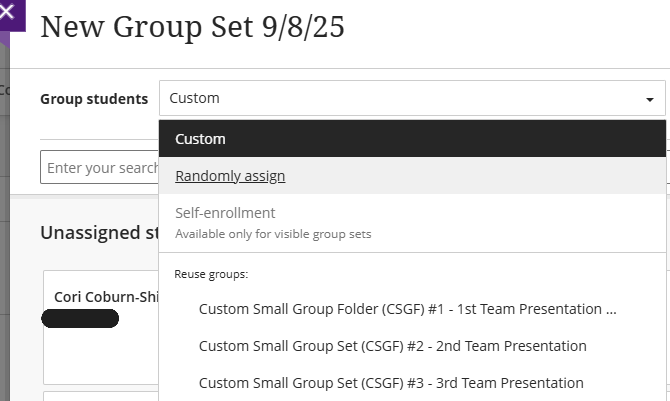
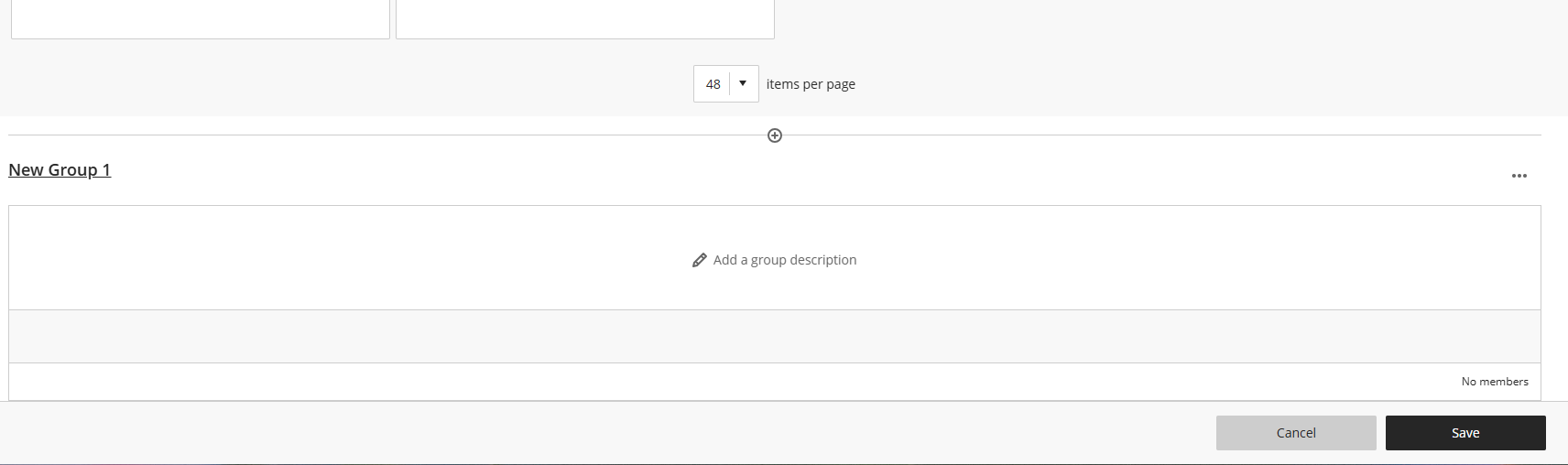
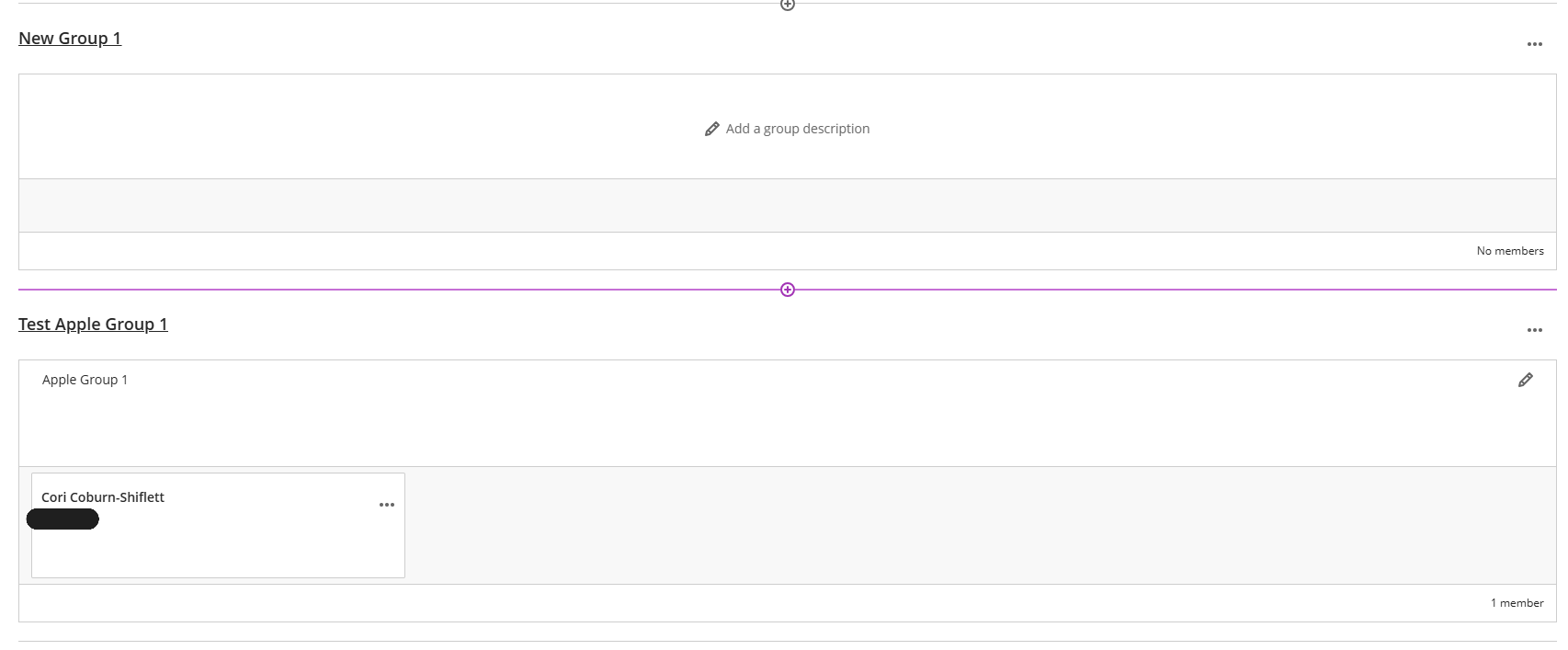
{"id":18890,"date":"2025-09-25T19:09:57","date_gmt":"2025-09-25T19:09:57","guid":{"rendered":"https:\/\/instruction.austincc.edu\/nexus\/?post_type=ht_kb&#038;p=18890"},"modified":"2025-10-29T14:06:18","modified_gmt":"2025-10-29T14:06:18","slug":"blackboard-ultra-creating-custom-groups","status":"publish","type":"ht_kb","link":"https:\/\/instruction.austincc.edu\/nexus\/article\/blackboard-ultra-creating-custom-groups\/","title":{"rendered":"Blackboard Ultra: Creating Custom Groups"},"content":{"rendered":"\n<h2 class=\"wp-block-heading\">Creating Custom Groups<\/h2>\n\n\n\n<p>Blackboard Ultra allows instructors to organize their students into <a href=\"https:\/\/help.blackboard.com\/Learn\/Student\/Ultra\/Interact\/Groups\">Groups<\/a>. Groups are a helpful tool which allow instructors to target assignments, communications, and files for specified groups of students.<\/p>\n\n\n\n<p>Students can either be placed into Groups per instructor support, or you can allow for students to self-assign themselves to groups you have pre-made in the course.<\/p>\n\n\n\n<ol class=\"wp-block-list\">\n<li>Open the <strong>Groups <\/strong>tab in your Blackboard Ultra Course.<\/li>\n<\/ol>\n\n\n\n<figure class=\"wp-block-gallery has-nested-images columns-default is-cropped wp-block-gallery-2 is-layout-flex wp-block-gallery-is-layout-flex\">\n<figure class=\"wp-block-image size-large\"><img data-recalc-dims=\"1\" loading=\"lazy\" decoding=\"async\" width=\"580\" height=\"146\" data-id=\"18909\" src=\"https:\/\/i0.wp.com\/instruction.austincc.edu\/nexus\/wp-content\/uploads\/sites\/66\/2025\/09\/Screenshot-2025-09-08-105030-1.png?resize=580%2C146&#038;ssl=1\" alt=\"A screenshot of the Manage Groups landing page after clicking on the Groups tab within a course in Blackboard Ultra. Group Sets are labeled there with visibility to students tagged, members listed on the right side, and a three dot edit panel that can be clicked to edit and add additional settings.\" class=\"wp-image-18909\" srcset=\"https:\/\/i0.wp.com\/instruction.austincc.edu\/nexus\/wp-content\/uploads\/sites\/66\/2025\/09\/Screenshot-2025-09-08-105030-1.png?resize=1024%2C257&amp;ssl=1 1024w, https:\/\/i0.wp.com\/instruction.austincc.edu\/nexus\/wp-content\/uploads\/sites\/66\/2025\/09\/Screenshot-2025-09-08-105030-1.png?resize=300%2C75&amp;ssl=1 300w, https:\/\/i0.wp.com\/instruction.austincc.edu\/nexus\/wp-content\/uploads\/sites\/66\/2025\/09\/Screenshot-2025-09-08-105030-1.png?resize=768%2C193&amp;ssl=1 768w, https:\/\/i0.wp.com\/instruction.austincc.edu\/nexus\/wp-content\/uploads\/sites\/66\/2025\/09\/Screenshot-2025-09-08-105030-1.png?resize=50%2C13&amp;ssl=1 50w, https:\/\/i0.wp.com\/instruction.austincc.edu\/nexus\/wp-content\/uploads\/sites\/66\/2025\/09\/Screenshot-2025-09-08-105030-1.png?resize=1536%2C386&amp;ssl=1 1536w, https:\/\/i0.wp.com\/instruction.austincc.edu\/nexus\/wp-content\/uploads\/sites\/66\/2025\/09\/Screenshot-2025-09-08-105030-1.png?resize=1200%2C302&amp;ssl=1 1200w, https:\/\/i0.wp.com\/instruction.austincc.edu\/nexus\/wp-content\/uploads\/sites\/66\/2025\/09\/Screenshot-2025-09-08-105030-1.png?w=1738&amp;ssl=1 1738w\" sizes=\"auto, (max-width: 580px) 100vw, 580px\" \/><\/figure>\n<\/figure>\n\n\n\n<p>2. Click <strong>New Group Set<\/strong> located on the right-hand side of the webpage. This will open a new window to create a <strong>Group Set<\/strong>. Label the Group Set with a title.<\/p>\n\n\n\n<figure class=\"wp-block-gallery has-nested-images columns-default is-cropped wp-block-gallery-3 is-layout-flex wp-block-gallery-is-layout-flex\">\n<figure class=\"wp-block-image size-large\"><img data-recalc-dims=\"1\" loading=\"lazy\" decoding=\"async\" width=\"580\" height=\"91\" data-id=\"18912\" src=\"https:\/\/i0.wp.com\/instruction.austincc.edu\/nexus\/wp-content\/uploads\/sites\/66\/2025\/09\/Screenshot-2025-09-08-105901.png?resize=580%2C91&#038;ssl=1\" alt=\"A screenshot of the New Group Set default landing page after clicking New Group Set. On this page, there is a field to select the type of groups created through using the dropdown menu titled Group students. There is also a field to note the Number of Groups made and a search bar in the middle of the page to search for students to then assign them to groups.\" class=\"wp-image-18912\" srcset=\"https:\/\/i0.wp.com\/instruction.austincc.edu\/nexus\/wp-content\/uploads\/sites\/66\/2025\/09\/Screenshot-2025-09-08-105901.png?resize=1024%2C160&amp;ssl=1 1024w, https:\/\/i0.wp.com\/instruction.austincc.edu\/nexus\/wp-content\/uploads\/sites\/66\/2025\/09\/Screenshot-2025-09-08-105901.png?resize=300%2C47&amp;ssl=1 300w, https:\/\/i0.wp.com\/instruction.austincc.edu\/nexus\/wp-content\/uploads\/sites\/66\/2025\/09\/Screenshot-2025-09-08-105901.png?resize=768%2C120&amp;ssl=1 768w, https:\/\/i0.wp.com\/instruction.austincc.edu\/nexus\/wp-content\/uploads\/sites\/66\/2025\/09\/Screenshot-2025-09-08-105901.png?resize=50%2C8&amp;ssl=1 50w, https:\/\/i0.wp.com\/instruction.austincc.edu\/nexus\/wp-content\/uploads\/sites\/66\/2025\/09\/Screenshot-2025-09-08-105901.png?resize=1536%2C241&amp;ssl=1 1536w, https:\/\/i0.wp.com\/instruction.austincc.edu\/nexus\/wp-content\/uploads\/sites\/66\/2025\/09\/Screenshot-2025-09-08-105901.png?resize=1200%2C188&amp;ssl=1 1200w, https:\/\/i0.wp.com\/instruction.austincc.edu\/nexus\/wp-content\/uploads\/sites\/66\/2025\/09\/Screenshot-2025-09-08-105901.png?w=1736&amp;ssl=1 1736w\" sizes=\"auto, (max-width: 580px) 100vw, 580px\" \/><\/figure>\n<\/figure>\n\n\n\n<p>Note: The <strong>Group Set <\/strong>should <em>not <\/em>be confused with the actual group of students created in the <strong>Course &#8211; Groups<\/strong> tab.<\/p>\n\n\n\n<p>3. Next to the Group Students label, click the dropdown menu to select how you would like to assign students into groups.<\/p>\n\n\n\n<p>Students can be assigned via <strong>Custom <\/strong>Groups, <strong>Randomly assigned <\/strong>Groups, or <strong>Self-enrollment <\/strong>Groups.  <\/p>\n\n\n\n<ul class=\"wp-block-list\">\n<li><strong>Custom <\/strong>groups are instructor chosen groups. Instructors must pre-assign students to groups.<\/li>\n\n\n\n<li><strong>Randomly assigned<\/strong> Groups will randomly generate a number of Groups and then pre-assign students to a Group.<\/li>\n\n\n\n<li><strong>Self-enrollment<\/strong> Groups allow for students to view the groups available and select which Group they would like to join. Instructors can always intervene and reassign students from these groups.<\/li>\n<\/ul>\n\n\n\n<figure class=\"wp-block-gallery has-nested-images columns-default is-cropped wp-block-gallery-4 is-layout-flex wp-block-gallery-is-layout-flex\">\n<figure class=\"wp-block-image size-large\"><img data-recalc-dims=\"1\" loading=\"lazy\" decoding=\"async\" width=\"580\" height=\"347\" data-id=\"18915\" src=\"https:\/\/i0.wp.com\/instruction.austincc.edu\/nexus\/wp-content\/uploads\/sites\/66\/2025\/09\/Screenshot-2025-09-08-110304.png?resize=580%2C347&#038;ssl=1\" alt=\"On the New Group Set landing page, this is a screenshot of the drowndown menu options for student groups. Student can be placed, per the dropdown selections, in Custom, Randomly assign, or Self-enrollment classified groups.\" class=\"wp-image-18915\" srcset=\"https:\/\/i0.wp.com\/instruction.austincc.edu\/nexus\/wp-content\/uploads\/sites\/66\/2025\/09\/Screenshot-2025-09-08-110304.png?w=670&amp;ssl=1 670w, https:\/\/i0.wp.com\/instruction.austincc.edu\/nexus\/wp-content\/uploads\/sites\/66\/2025\/09\/Screenshot-2025-09-08-110304.png?resize=300%2C180&amp;ssl=1 300w, https:\/\/i0.wp.com\/instruction.austincc.edu\/nexus\/wp-content\/uploads\/sites\/66\/2025\/09\/Screenshot-2025-09-08-110304.png?resize=50%2C30&amp;ssl=1 50w\" sizes=\"auto, (max-width: 580px) 100vw, 580px\" \/><\/figure>\n<\/figure>\n\n\n\n<p>4. Within the <strong>Group Set<\/strong>, after you have selected how to <strong>Group Students<\/strong>, locate the purple addition field (+) line along the bottom of the webpage.<\/p>\n\n\n\n<p>Click this field to then build and label each <strong>Group<\/strong> you want within this <strong>Group Set<\/strong>.<\/p>\n\n\n\n<figure class=\"wp-block-gallery has-nested-images columns-default is-cropped wp-block-gallery-5 is-layout-flex wp-block-gallery-is-layout-flex\">\n<figure class=\"wp-block-image size-large\"><img data-recalc-dims=\"1\" loading=\"lazy\" decoding=\"async\" width=\"580\" height=\"89\" data-id=\"18918\" src=\"https:\/\/i0.wp.com\/instruction.austincc.edu\/nexus\/wp-content\/uploads\/sites\/66\/2025\/09\/Screenshot-2025-09-08-111356.png?resize=580%2C89&#038;ssl=1\" alt=\"Screenshot of the light purple bar which appears and has a small plus (+) symbol, indicating that the mouse is hovering over the bar and the add-to field is being accessed on the page.\" class=\"wp-image-18918\" srcset=\"https:\/\/i0.wp.com\/instruction.austincc.edu\/nexus\/wp-content\/uploads\/sites\/66\/2025\/09\/Screenshot-2025-09-08-111356.png?resize=1024%2C157&amp;ssl=1 1024w, https:\/\/i0.wp.com\/instruction.austincc.edu\/nexus\/wp-content\/uploads\/sites\/66\/2025\/09\/Screenshot-2025-09-08-111356.png?resize=300%2C46&amp;ssl=1 300w, https:\/\/i0.wp.com\/instruction.austincc.edu\/nexus\/wp-content\/uploads\/sites\/66\/2025\/09\/Screenshot-2025-09-08-111356.png?resize=768%2C118&amp;ssl=1 768w, https:\/\/i0.wp.com\/instruction.austincc.edu\/nexus\/wp-content\/uploads\/sites\/66\/2025\/09\/Screenshot-2025-09-08-111356.png?resize=50%2C8&amp;ssl=1 50w, https:\/\/i0.wp.com\/instruction.austincc.edu\/nexus\/wp-content\/uploads\/sites\/66\/2025\/09\/Screenshot-2025-09-08-111356.png?resize=1536%2C236&amp;ssl=1 1536w, https:\/\/i0.wp.com\/instruction.austincc.edu\/nexus\/wp-content\/uploads\/sites\/66\/2025\/09\/Screenshot-2025-09-08-111356.png?resize=1200%2C184&amp;ssl=1 1200w, https:\/\/i0.wp.com\/instruction.austincc.edu\/nexus\/wp-content\/uploads\/sites\/66\/2025\/09\/Screenshot-2025-09-08-111356.png?w=1726&amp;ssl=1 1726w\" sizes=\"auto, (max-width: 580px) 100vw, 580px\" \/><figcaption class=\"wp-element-caption\">Highlighting the purple addition field (+).<\/figcaption><\/figure>\n<\/figure>\n\n\n\n<figure class=\"wp-block-image size-large\"><img data-recalc-dims=\"1\" loading=\"lazy\" decoding=\"async\" width=\"580\" height=\"172\" src=\"https:\/\/i0.wp.com\/instruction.austincc.edu\/nexus\/wp-content\/uploads\/sites\/66\/2025\/09\/Screenshot-2025-09-08-111519-1.png?resize=580%2C172&#038;ssl=1\" alt=\"A screenshot of a new group, labeled New Group 1, within a Group Set landing page. There are three dots on the right side to edit the group or add members. There is a blank field to click into which allows instructors to list a group description.\" class=\"wp-image-18920\" srcset=\"https:\/\/i0.wp.com\/instruction.austincc.edu\/nexus\/wp-content\/uploads\/sites\/66\/2025\/09\/Screenshot-2025-09-08-111519-1.png?resize=1024%2C304&amp;ssl=1 1024w, https:\/\/i0.wp.com\/instruction.austincc.edu\/nexus\/wp-content\/uploads\/sites\/66\/2025\/09\/Screenshot-2025-09-08-111519-1.png?resize=300%2C89&amp;ssl=1 300w, https:\/\/i0.wp.com\/instruction.austincc.edu\/nexus\/wp-content\/uploads\/sites\/66\/2025\/09\/Screenshot-2025-09-08-111519-1.png?resize=768%2C228&amp;ssl=1 768w, https:\/\/i0.wp.com\/instruction.austincc.edu\/nexus\/wp-content\/uploads\/sites\/66\/2025\/09\/Screenshot-2025-09-08-111519-1.png?resize=50%2C15&amp;ssl=1 50w, https:\/\/i0.wp.com\/instruction.austincc.edu\/nexus\/wp-content\/uploads\/sites\/66\/2025\/09\/Screenshot-2025-09-08-111519-1.png?resize=1536%2C456&amp;ssl=1 1536w, https:\/\/i0.wp.com\/instruction.austincc.edu\/nexus\/wp-content\/uploads\/sites\/66\/2025\/09\/Screenshot-2025-09-08-111519-1.png?resize=1200%2C356&amp;ssl=1 1200w, https:\/\/i0.wp.com\/instruction.austincc.edu\/nexus\/wp-content\/uploads\/sites\/66\/2025\/09\/Screenshot-2025-09-08-111519-1.png?w=1712&amp;ssl=1 1712w\" sizes=\"auto, (max-width: 580px) 100vw, 580px\" \/><figcaption class=\"wp-element-caption\">After clicking the purple addition field (+).<\/figcaption><\/figure>\n\n\n\n<p>After clicking the <strong>purple addition field (+)<\/strong> there is a prompt which appears with a box to label the new group in the field, <strong>New Group 1<\/strong>.<\/p>\n\n\n\n<p>This is the first official <strong>Group <\/strong>of this student <strong>Group Set<\/strong>.<\/p>\n\n\n\n<p>Label the <strong>Group <\/strong>and then add a <strong>Description <\/strong>as is appropriate.<\/p>\n\n\n\n<p>5. Click the <strong>three dots <\/strong>alongside a student&#8217;s name and text box to <strong>Edit<\/strong> Group Membership. Assign the student to the <strong>Group <\/strong>you have created within this set.<\/p>\n\n\n\n<p>Alternatively, instructors can create a new <strong>Group <\/strong>using the <strong>+Create a new group<\/strong> dropdown field.<\/p>\n\n\n\n<figure class=\"wp-block-image size-full\"><img data-recalc-dims=\"1\" loading=\"lazy\" decoding=\"async\" width=\"440\" height=\"849\" src=\"https:\/\/i0.wp.com\/instruction.austincc.edu\/nexus\/wp-content\/uploads\/sites\/66\/2025\/09\/Screenshot-2025-09-08-111921.png?resize=440%2C849&#038;ssl=1\" alt=\"This is a screenshot of the webpage after a student has been located using the search bar on the Group Set landing page. The student's name is selected and there are options when clicking the three dots along the right side of the student name. The field will appear which states &quot;1 participant selected&quot; and underneath there are clickable fields. One field is titled &quot;Create a new group&quot; and the other field is the group used for this example, labeled &quot;Test Apple Group 1&quot;.\" class=\"wp-image-18921\" srcset=\"https:\/\/i0.wp.com\/instruction.austincc.edu\/nexus\/wp-content\/uploads\/sites\/66\/2025\/09\/Screenshot-2025-09-08-111921.png?w=440&amp;ssl=1 440w, https:\/\/i0.wp.com\/instruction.austincc.edu\/nexus\/wp-content\/uploads\/sites\/66\/2025\/09\/Screenshot-2025-09-08-111921.png?resize=155%2C300&amp;ssl=1 155w, https:\/\/i0.wp.com\/instruction.austincc.edu\/nexus\/wp-content\/uploads\/sites\/66\/2025\/09\/Screenshot-2025-09-08-111921.png?resize=26%2C50&amp;ssl=1 26w\" sizes=\"auto, (max-width: 440px) 100vw, 440px\" \/><\/figure>\n\n\n\n<p>6. Once a student has been assigned to a <strong>Group<\/strong>, their name and profile will now appear beneath that <strong>Group <\/strong>on the webpage. <\/p>\n\n\n\n<p>Complete this process for all students to assign all students to <strong>Groups<\/strong>.<\/p>\n\n\n\n<figure class=\"wp-block-image size-large\"><img data-recalc-dims=\"1\" loading=\"lazy\" decoding=\"async\" width=\"580\" height=\"240\" src=\"https:\/\/i0.wp.com\/instruction.austincc.edu\/nexus\/wp-content\/uploads\/sites\/66\/2025\/09\/Screenshot-2025-09-08-112445.png?resize=580%2C240&#038;ssl=1\" alt=\"Screenshot of the light purple bar which appears and has a small plus (+) symbol, indicating that the mouse is hovering over the bar and the add-to field is being accessed on the page. Beneath this hover-addition bar, there is the &quot;Test Apple Group 1&quot; which was listed in the previous example, with the selected student's name appearing there after they were assigned to that group.\" class=\"wp-image-18923\" srcset=\"https:\/\/i0.wp.com\/instruction.austincc.edu\/nexus\/wp-content\/uploads\/sites\/66\/2025\/09\/Screenshot-2025-09-08-112445.png?resize=1024%2C424&amp;ssl=1 1024w, https:\/\/i0.wp.com\/instruction.austincc.edu\/nexus\/wp-content\/uploads\/sites\/66\/2025\/09\/Screenshot-2025-09-08-112445.png?resize=300%2C124&amp;ssl=1 300w, https:\/\/i0.wp.com\/instruction.austincc.edu\/nexus\/wp-content\/uploads\/sites\/66\/2025\/09\/Screenshot-2025-09-08-112445.png?resize=768%2C318&amp;ssl=1 768w, https:\/\/i0.wp.com\/instruction.austincc.edu\/nexus\/wp-content\/uploads\/sites\/66\/2025\/09\/Screenshot-2025-09-08-112445.png?resize=50%2C21&amp;ssl=1 50w, https:\/\/i0.wp.com\/instruction.austincc.edu\/nexus\/wp-content\/uploads\/sites\/66\/2025\/09\/Screenshot-2025-09-08-112445.png?resize=1536%2C637&amp;ssl=1 1536w, https:\/\/i0.wp.com\/instruction.austincc.edu\/nexus\/wp-content\/uploads\/sites\/66\/2025\/09\/Screenshot-2025-09-08-112445.png?resize=1200%2C497&amp;ssl=1 1200w, https:\/\/i0.wp.com\/instruction.austincc.edu\/nexus\/wp-content\/uploads\/sites\/66\/2025\/09\/Screenshot-2025-09-08-112445.png?w=1706&amp;ssl=1 1706w\" sizes=\"auto, (max-width: 580px) 100vw, 580px\" \/><\/figure>\n\n\n\n<p>Be sure to click <strong>Save<\/strong> in the lower-right-hand corner of the webpage screen to save and activate student groups.<\/p>\n\n\n\n<p>For a more in-depth explanation of Student Groups from the <strong>Student View<\/strong> Perspective, see the linked <strong>Blackboard Ultra Resource Video<\/strong> below.<\/p>\n\n\n\n<figure class=\"wp-block-embed is-type-video is-provider-vimeo wp-block-embed-vimeo wp-embed-aspect-16-9 wp-has-aspect-ratio\"><div class=\"wp-block-embed__wrapper\">\n<iframe loading=\"lazy\" title=\"Work in Groups in Blackboard - Students\" src=\"https:\/\/player.vimeo.com\/video\/1044762763?dnt=1&amp;app_id=122963\" width=\"580\" height=\"326\" frameborder=\"0\" allow=\"autoplay; fullscreen; picture-in-picture; clipboard-write; encrypted-media; web-share\" referrerpolicy=\"strict-origin-when-cross-origin\"><\/iframe>\n<\/div><\/figure>\n\n\n\n<h2 class=\"wp-block-heading\">Contact Support<\/h2>\n\n\n\n<p>This article was created and is maintained by the&nbsp;<a href=\"https:\/\/tled.austincc.edu\/tled-offices\/office-of-academic-technology\/\">Office of Academic Technology<\/a><\/p>\n\n\n\n<p>If you have found an error in this article, or if you need assistance incorporating this article into your course, please contact us via the\u00a0<a href=\"https:\/\/acchelp.austincc.edu\/TDClient\/277\/Portal\/Requests\/ServiceCatalog?CategoryID=1377\">Teaching &amp; Learning Services Request Page<\/a><\/p>\n","protected":false},"excerpt":{"rendered":"<p>Creating Custom Groups Blackboard Ultra allows instructors to organize their students into Groups. Groups are a helpful tool which allow instructors to target assignments, communications, and files for specified groups of students. Students can either be placed into Groups per instructor support, or you can allow for students to self-assign themselves to groups you have [&hellip;]<\/p>\n","protected":false},"author":126,"comment_status":"closed","ping_status":"closed","template":"","format":"standard","meta":{"_acf_changed":false,"footnotes":""},"ht-kb-category":[455,418],"ht-kb-tag":[128,458,449,474,432],"class_list":["post-18890","ht_kb","type-ht_kb","status-publish","format-standard","hentry","ht_kb_category-course-set-up","ht_kb_category-blackboard-ultra","ht_kb_tag-blackboard","ht_kb_tag-blackboard-ultra","ht_kb_tag-student-activity","ht_kb_tag-student-groups","ht_kb_tag-ultra"],"acf":[],"jetpack_sharing_enabled":true,"_links":{"self":[{"href":"https:\/\/instruction.austincc.edu\/nexus\/wp-json\/wp\/v2\/ht-kb\/18890","targetHints":{"allow":["GET"]}}],"collection":[{"href":"https:\/\/instruction.austincc.edu\/nexus\/wp-json\/wp\/v2\/ht-kb"}],"about":[{"href":"https:\/\/instruction.austincc.edu\/nexus\/wp-json\/wp\/v2\/types\/ht_kb"}],"author":[{"embeddable":true,"href":"https:\/\/instruction.austincc.edu\/nexus\/wp-json\/wp\/v2\/users\/126"}],"replies":[{"embeddable":true,"href":"https:\/\/instruction.austincc.edu\/nexus\/wp-json\/wp\/v2\/comments?post=18890"}],"version-history":[{"count":0,"href":"https:\/\/instruction.austincc.edu\/nexus\/wp-json\/wp\/v2\/ht-kb\/18890\/revisions"}],"wp:attachment":[{"href":"https:\/\/instruction.austincc.edu\/nexus\/wp-json\/wp\/v2\/media?parent=18890"}],"wp:term":[{"taxonomy":"ht_kb_category","embeddable":true,"href":"https:\/\/instruction.austincc.edu\/nexus\/wp-json\/wp\/v2\/ht-kb-category?post=18890"},{"taxonomy":"ht_kb_tag","embeddable":true,"href":"https:\/\/instruction.austincc.edu\/nexus\/wp-json\/wp\/v2\/ht-kb-tag?post=18890"}],"curies":[{"name":"wp","href":"https:\/\/api.w.org\/{rel}","templated":true}]}}