

Self-Enrollment Instructions
Thank you for your interest in joining a Faculty Growth Series course. Please follow the steps below to self-enroll in the FGS course(s) of your choosing. The necessary links to Blackboard are further down this page. After following the directions below, the link will take you directly to the Blackboard Ultra self-enrollment page.
!
How to Self-Enroll
- Log in to Blackboard first — you must be logged into Bb before taking the next steps.
- Click on the course link below.
- If necessary, log in again with your ACC credentials, if prompted.
- You should arrive at the Blackboard Ultra self-enrollment page.
- Select Submit to complete enrollment.
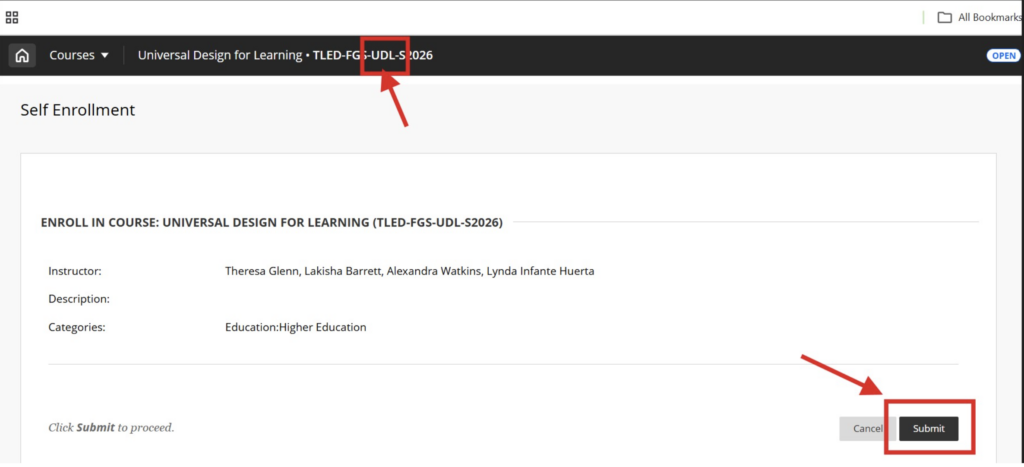
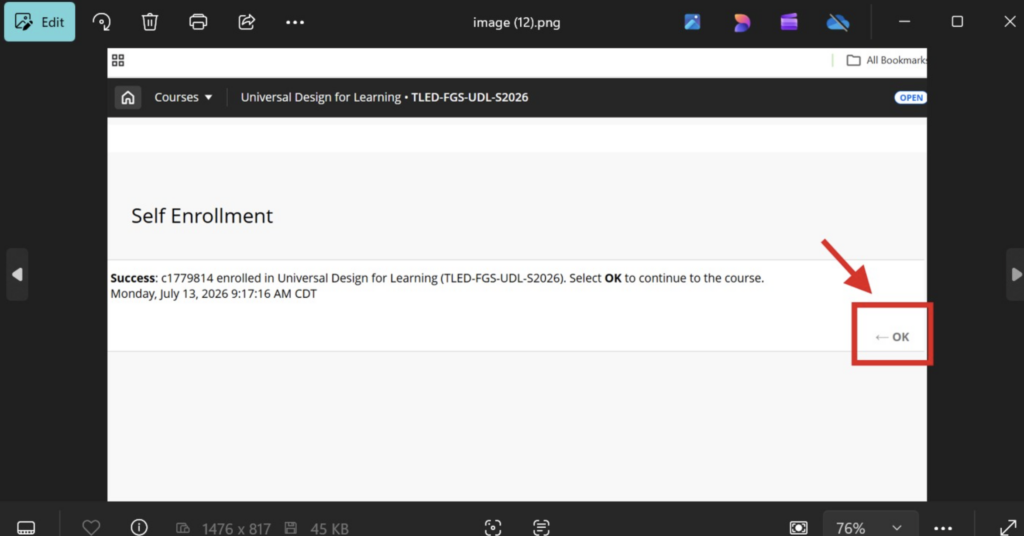
- After submitting, click “OK.” The course should appear in your Blackboard course list. Let the learning continue!
Course Self-Enrollment Links
Links updated 6/11/2026
Helpful Tips
Please make sure you are signed into ACC Blackboard before clicking the link, or be prepared to sign in when prompted. If the link does not open correctly, try copying and pasting it into a browser. If you are already logged into another Blackboard session, sign out, close the browser, and try the link again from the email. Reach out to [email protected] with any questions.
🛑 STOP: Please make sure you are signed into Blackboard before clicking the link below.
AI Literacy & Fluency
Belonging, Purpose & Connection
Universal Design for Learning & Accessibility