Overwhelmed
by Technology?
Technology is moving so fast these days, it's hard to keep up. This program offers microcredentials that cover foundational skills and professional competencies in many high-demand areas that are needed in school, the workforce, and even in your day-to-day life.

Ready for a
Career Change?
Moving into a different field often requires learning new skills. Our microcredential program offers a great way to quickly gain in-demand digital skills, along with portable digital badges that can be shared with potential employers and posted on social media, such as LinkedIn.

Need a Supportive
Learning Environment?
Many online courses offer ways to learn quickly and inexpensively, but don't offer a lot of support, if you need it. Our program has dedicated digital navigators who provide guidance, encouragement, and feedback, to help you stay on track.

Need Digital Skills,
like yesterday?
Sometimes we need to pick up skills quickly. Maybe it's to master PowerPoint so that you can ace a presentation, or fill in gaps on a resume to apply for a promotion or new job. Our 16 microcredentials in high-demand digital skills are designed to take an average of 20 to 26 hours to complete.

Told Techology was
not for you?
Whether you have always wanted to learn how to make a website or produce a video, become proficient in HTML, or beef up your knowledge of spreadsheets or presentation software, our program can help you can build your digital fluency without worrying about barriers.

Need Digital Skills
for College?
College requires technical knowledge in a lot of areas such as word processing, presentation software, spreadsheets, internet research, and even basic computing. Our program helps you fill in the gaps quickly to get the skills you need to be successful in college.
Microcredentials take an average of 20 – 27 hours to complete the instructional articles and videos, plus you’ll need additional time to do assignments and quizzes.
The microcredentials are non-credit but stack to one of four microcertificates. Each microcertificate equates to a credit course in Computer Science and Information Technology (CSIT).
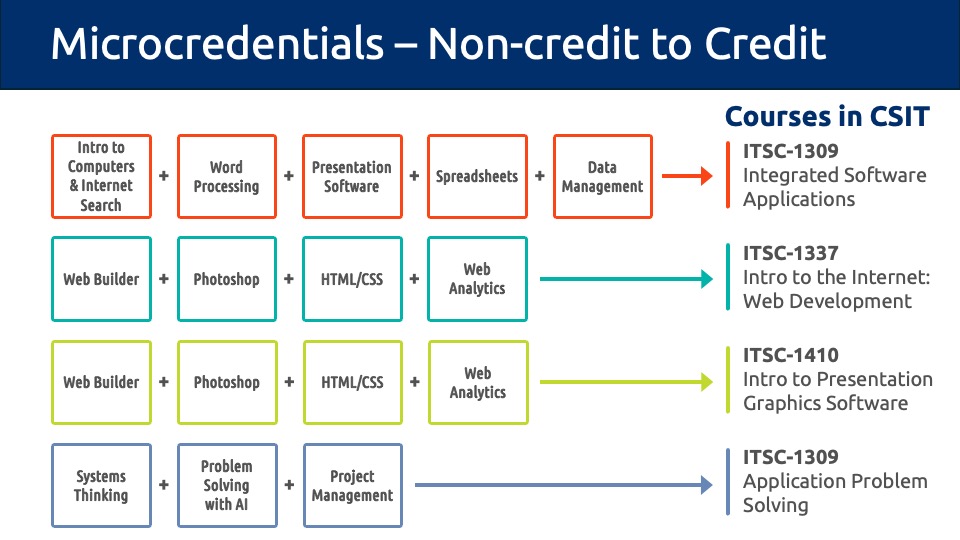
Students may receive up to 13 credit hours in CSIT courses by completing all 16 microcredentials. Visit the Microcredential page to learn more.
The microcredentials are open to active ACC students, faculty, and staff.
Note: A student hold may prevent you from being enrolled in microcredentials.
Check the notifications section in MyACC for any student holds you may have.
We have easy, step-by-step instructions for adding badges to LinkedIn
If you aren’t able to complete a microcredential within the 5-week session, you can retake the microcredential in the future.
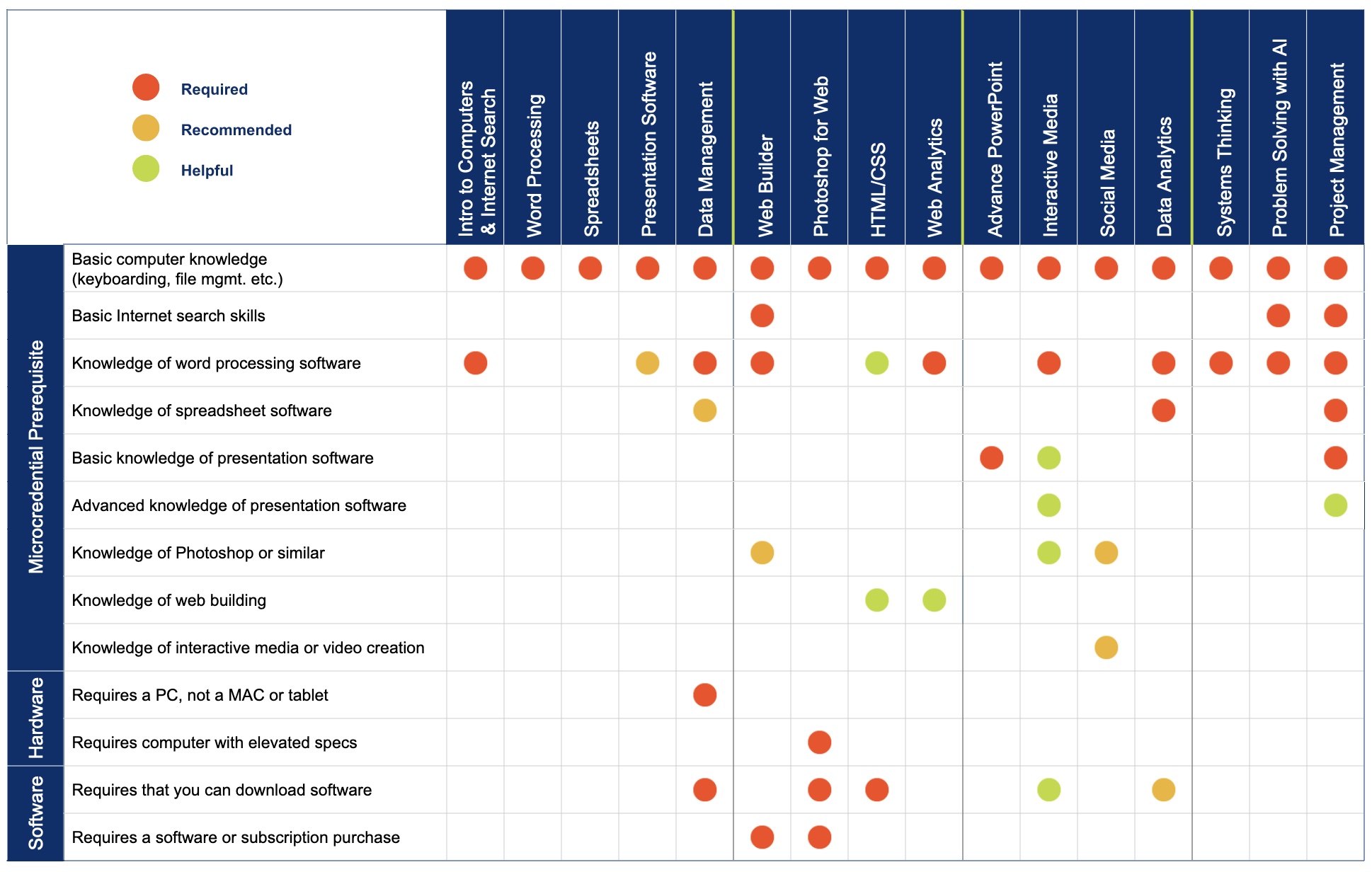
- All the DFI microcredentials require very basic knowledge of computers including how to turn on a computer, how to create and save files, and how to use a keyboard.
- Some microcredentials require additional digital skills to complete assignments. An example would be using Microsoft Word to complete an assignment.
- A few microcredentials have hardware or software requirements. An example would be to learn Photoshop, you will need a computer with appropriate computing power, and a copy of Photoshop loaded onto your computer (available at a significant discount for students).
Click on the screenshot below to open the Google spreadsheet and view specific microcredential requirements.